
Book cover template: how a full wrap with spine, back and barcode is built
Book cover template explained: back, spine and front in one print file, KDP and IngramSpark specs side by side, barcode area, ebook and audiobook sizes.
Short answer
A print book cover template is one file with the back cover, spine and front cover side by side, plus bleed on every outer edge (0.125 in at KDP and IngramSpark), text at least 0.125 in inside the trim and a clear area for the ISBN barcode on the back.
- The spine width comes from page count and paper; KDP allows spine text from 79 pages (as of November 2026).
Contents
A book cover template for a printed book is a single canvas: the back cover on the left, the spine in the middle, the front on the right, and a thin strip of bleed around the outside that gets trimmed off. The spine width comes from your page count and paper, text stays at least 0.125 in away from every trim line, and the back needs a clear area for the ISBN barcode. If you just need the numbers, our free KDP cover calculator works them out and gives you an SVG template with guides.
Below you'll see the anatomy on a real example, the KDP and IngramSpark specs side by side, what belongs on the spine and back, and what changes for ebooks and audiobooks.
What's on a full book cover template?
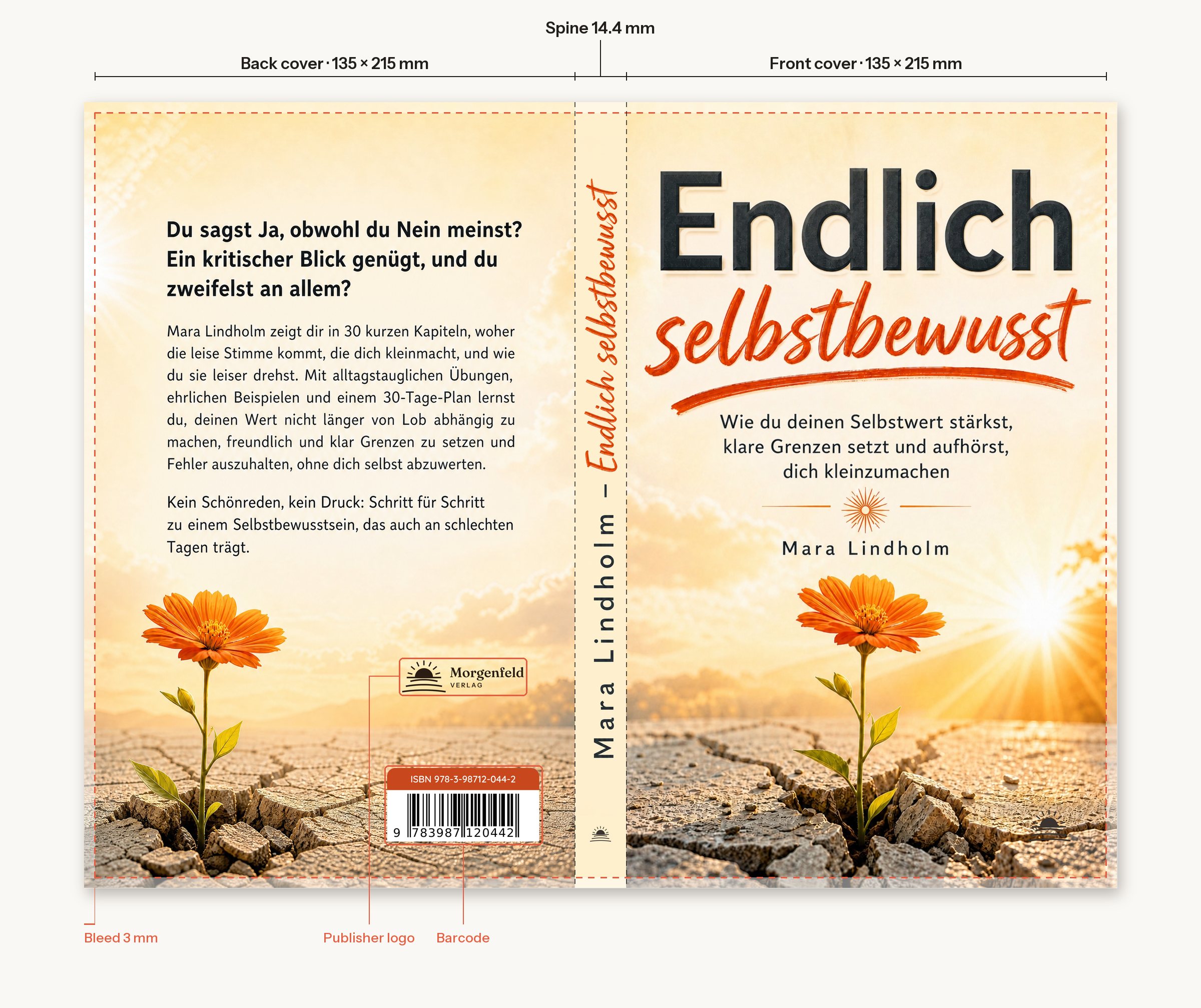
Read from left to right, the printer sees:
| Part | What goes on it | What to watch |
|---|---|---|
| Bleed | Background only | Trimmed off, artwork runs into it |
| Back cover | Blurb, author line, publisher logo, barcode | Barcode area clear, text in the safe area |
| Spine | Title, author, often a publisher mark | Width from page count and paper, distance to the folds |
| Front cover | Title, subtitle, author, artwork | Also your ebook cover, must read at thumbnail size |
| Bleed | Background only | Trimmed off |
The front sells the book online, the back sells it in a shop, the spine sells it on a shelf. If you only designed a front, you have a third of a paperback cover.
How do you calculate the template size?
Every print service uses the same formula:
- Width = bleed + back cover + spine + front cover + bleed
- Height = bleed + trim height + bleed
For a 6 × 9 in paperback with 240 pages on white paper at KDP: spine 240 × 0.002252 in = 0.540 in, width 0.125 + 6 + 0.540 + 6 + 0.125 = 12.790 in, height 0.125 + 9 + 0.125 = 9.25 in. At 300 dpi that's a canvas of 3,837 × 2,775 pixels. On cream paper the same book has a 0.600 in spine. The example above was set up with 3 mm bleed and a different paper, which is why its spine is 14.4 mm. That's the point: the template from the service you print with is the one that counts.
The paper factors for every KDP paper type, a worked example for a 5.5 × 8.5 in novel and the hardcover rules are in our guide KDP spine width. For the spine alone, use the book spine calculator.
KDP and IngramSpark compared
| Spec | Amazon KDP | IngramSpark |
|---|---|---|
| Bleed | 0.125 in top, bottom, outside | 0.125 in on all four sides |
| Text distance from trim | at least 0.125 in | 0.25 in recommended, template allows 0.125 in |
| Text on the spine | from 79 pages (Cover Creator: 80) | from 48 pages |
| Spine text distance from folds | 0.0625 in | 0.0625 in, 0.03125 in for spines under 0.35 in |
| Barcode | KDP adds one if you don't | Mandatory on every cover |
| Image resolution | at least 300 dpi | 300 ppi, under 200 ppi may be rejected |
| Colour | CMYK recommended | CMYK, total ink at most 240% |
| File | one PDF, fonts embedded | PDF/X-1a:2001 or PDF/X-3:2002 on the template |
| File size | up to 650 MB, 40 MB recommended | uploads up to 1.5 GB |
As of 7 November 2026, from the KDP help pages and the IngramSpark File Creation Guide (sources below). For IngramSpark you must use the template from its generator; it arrives by email, and apart from the barcode nothing on it may be moved. To turn a finished file into the PDF/X format IngramSpark asks for, use our PDF/X-1a converter.
How to design the spine
The spine is all a reader sees on a shelf. Three rules:
- Only with enough pages. KDP rejects a cover with spine text if the book has fewer than 79 pages. IngramSpark's limit is 48 pages.
- Keep off the folds. At KDP, leave at least 0.0625 in between the text and each spine edge, or the type can wrap onto the front or back when the book is bound.
- Keep it short. Title and surname are enough. A 0.540 in spine leaves about 0.41 in for the type after the margins. A subtitle won't be readable there.
Run the background across the spine so a fold that lands slightly off doesn't show as a hard edge. A colour change exactly on the fold line forgives no shift at all.
What goes on the back cover?
Top to bottom:
- Hook: one or two lines that pick up the reader's question.
- Blurb: a short text on what the book is about and what the reader gets from it. The book blurb tool drafts one from your manuscript.
- Author line and, if you have one, a publisher logo.
- Barcode in the lower right, on a white background.
This is where KDP and IngramSpark differ. KDP automatically places a barcode on the back if you don't supply your own; you keep the area clear that the KDP template shows. IngramSpark requires a barcode on every cover. A barcode you create must be 100% black on a white box; if you don't supply one, leave an area of at least 1.75 × 1 in. You can make a barcode from your ISBN for free with the ISBN barcode generator.

Ebook and audiobook covers
An ebook only needs the front. KDP recommends 2,560 pixels high by 1,600 wide, at least 500 pixels on the longest side and no more than 50 MB. Spine, barcode and back cover don't belong in it, and neither do prices or time-limited offers. IngramSpark takes an RGB JPG for ebooks with at least 1,600 pixels on the shortest side.
An audiobook cover is square. ACX, Audible's audiobook platform, asks for at least 2,400 × 2,400 pixels, RGB, no more than 8 MB, title and author clearly readable, no barcode, and no borders added to turn a portrait image into a square. You have to rearrange the paperback artwork for it, not just crop it.
| Edition | Size | What's on it |
|---|---|---|
| Paperback | one PDF with bleed | back, spine, front, barcode |
| Ebook (KDP) | 1,600 × 2,560 px, JPG preferred | front only |
| Audiobook (ACX) | from 2,400 × 2,400 px, square | title and author, no barcode |
Three ways to a full cover
| Feature | Bookfairy cover tool | KDP Cover Creator | Template + your own design software |
|---|---|---|---|
| Back, spine, front | in one print PDF | yes, inside KDP | by hand on the template |
| Spine width | calculated from page count and paper | from your uploaded interior | copied from the calculator or template |
| Barcode | placed on the back from your ISBN | ISBN in the barcode area | KDP adds it; at IngramSpark you place it |
| Artwork | drafts from your book details, up to three bestsellers as style models | image gallery or your own image | you design it |
| File for other printers | print PDF to download | covers with gallery images can't be used outside KDP | yes |
| Price | $12, three drafts free | free | templates free, software and time are yours |
As of 7 November 2026; KDP details from the KDP help pages (Cover Creator, Create a Paperback Cover). Kindle Direct Publishing and IngramSpark are trademarks of their respective owners. Bookfairy is not affiliated with them.
With the Bookfairy cover tool you enter title, trim size and page count and see three drafts for free. The finished cover comes with front, spine and back in your measurements as a print PDF, plus the front for your ebook, and you ask for changes in your own words.
Common mistakes on spine and back
- Cover built before the interior was final. One more chapter and the spine is wrong.
- Paper changed. Designed for white, ordered cream: at 240 pages that's 0.06 in.
- Text in the bleed. Anything closer than 0.125 in to the trim can be cut.
- Pattern behind the barcode. It makes the barcode unreadable; IngramSpark replaces unscannable barcodes without telling you.
- Spine text on a thin book. Under 79 pages KDP rejects the cover.
- Paperback file used as the ebook cover. Spine and back don't belong in a store thumbnail.
Frequently asked
How wide should the spine be on a KDP cover?
It depends only on page count and paper. At KDP the spine is page count × 0.002252 in on white paper and × 0.0025 in on cream. 240 pages on white paper give a 0.540 in spine. IngramSpark puts the spine width into the template from its generator.
How many pages do I need for text on the spine?
79 pages at KDP, 80 pages in KDP's free Cover Creator. IngramSpark allows spine text on paperbacks from 48 pages. Below that, leave the spine blank.
Do I have to add the barcode myself?
Not at KDP: if you don't supply one, KDP places a barcode on the back cover, so you keep that area clear. IngramSpark requires a barcode on every cover; without your own, leave an area of at least 1.75 × 1 in.
Can I use my paperback cover as the ebook cover?
Only the front. KDP wants an ebook cover without spine, back or barcode, ideally 1,600 × 2,560 pixels. An audiobook cover for ACX is square, at least 2,400 × 2,400 pixels.
How much bleed does a book cover need?
0.125 in (3.2 mm) on top, bottom and outside edges at KDP, 0.125 in (3 mm) on all four sides at IngramSpark. Background and images run into the bleed, text stays out.
Sources (6)
- Amazon KDP: Create a Paperback Cover (retrieved 7 Nov 2026)
- Amazon KDP: Cover Creator (retrieved 7 Nov 2026)
- Amazon KDP: Cover Image Guidelines for Kindle eBooks (retrieved 7 Nov 2026)
- Amazon KDP: Print Cover Calculator and Templates (retrieved 7 Nov 2026)
- IngramSpark: File Creation Guide, 24 Aug 2026, pp. 5, 6, 18–20 (retrieved 7 Nov 2026)
- ACX: Cover art requirements (retrieved 7 Nov 2026)