- Bookfairy
- The toolbox
- Typesetting
Book formatting for print, ready for KDP.
Print PDF in a proper book layout
- Real book typesetting: justified text, hyphenation, chapter openings
- First 10 pages free in your chosen layout
- Print PDF in common KDP trim sizes
Typesetting
Free preview: First 10 pages in your layout (watermarked)


Real results from the typesetting tool, fictional titles. Tap to enlarge the spread.
What you get out of it
Like a publisher's
Justified text, hyphenation, chapter openers, running heads. The layouts come from our own production.
See 10 pages first
The first 10 pages are free in your layout. If it doesn't suit, pick another.
No software needed
Pro layout programs cost around $150 to $250 once (as of November 2026) and take time to learn. Here you pay $18 per book.
What the typesetting includes
Everything that turns a Word file into a book interior a printer accepts.
-
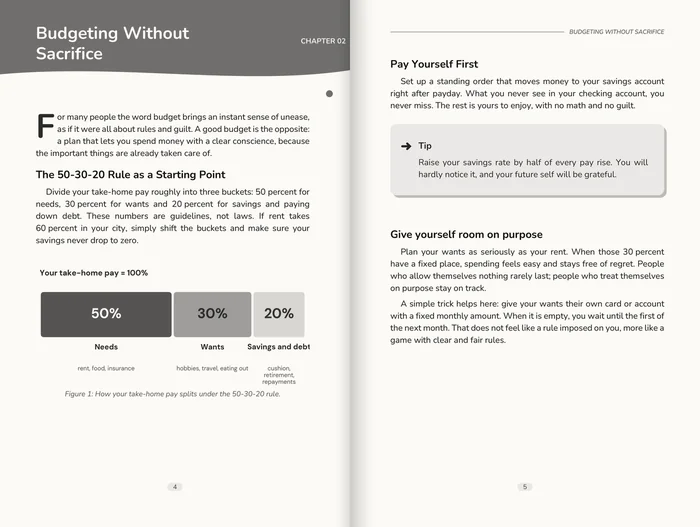
Layouts from our own production
Chapter openings, running heads, page numbers, justified text with clean hyphenation.
-
Front matter in place
Title page, copyright page and table of contents, in the order printers and readers expect.
-
Print PDF with bleed
Trim and bleed set, fonts embedded, colour profile included. Accepted by KDP.
-
First 10 pages free
In exactly the layout and trim size you chose, with a watermark.
-
EPUB at a bundle price
Tick the EPUB box and you get print PDF and ebook together for $26.40220 tokens.
-
One PDF/X-1a for everything
Your print PDF is a PDF/X-1a:2001: the same file for Amazon KDP, IngramSpark and any printer.
Book formatting that readers don't notice
Choose a layout and get a print PDF that looks like it came from a publisher: chapter openings, running heads, page numbers and clean hyphenation.
Good typesetting is invisible: the reader simply keeps reading. Bad typesetting shows on every page, in gaps, stray lines and wrong margins. The layouts come from our own production and handle the details that word processors leave to you.
What is in the print PDF, and what is PDF/X?
Printers don't check whether a book looks nice. They check whether the file prints without surprises. Here is what our print PDF contains, and when you need more.
Fonts embedded
Every font travels inside the PDF. Missing fonts are the most common reason for a rejected interior.
Trim and bleed
The PDF knows its final page size (trim box) and the 3 mm beyond it (bleed box). Images that run to the edge are cut cleanly.
Colour profile
An output intent (FOGRA39) tells the printer which printing conditions the colours were made for.
PDF/X-1a:2001
Your print PDF is a PDF/X-1a:2001 (ISO 15930-1), the standard KDP prefers and IngramSpark requires. We check it against the standard before you get it.
Which platform wants what
- Amazon KDP names PDF/X-1a as its preferred format and also accepts other print PDFs. It asks for embedded fonts, 3.2 mm (0.125") bleed where content runs to the edge, images of at least 300 DPI and flattened transparency. Our PDF/X-1a:2001 meets this, since the standard allows no transparency at all.
- IngramSpark asks in its File Creation Guide for PDF/X-1a:2001 or PDF/X-3:2002, all fonts embedded and a total ink coverage of at most 240%. That is why our typesetting always delivers the print PDF as PDF/X-1a:2001, one file for every channel. PDFs from other programs can go through our PDF/X-1a converter.
What PDF/X-1a adds
PDF/X-1a is the stricter, older standard: PDF version 1.3 or 1.4, only CMYK colours (no RGB images or vectors), no transparency, all fonts embedded, no comments or links, and an output intent. Our typesetting checks exactly these points before you get the file.
- Amazon KDP Help, Paperback and hardcover manuscript formatting guide. kdp.amazon.com/en_US/help/topic/G201857950
- Amazon KDP Help, Create a paperback manuscript: "PDF/X-1a is preferred", flatten transparency (as of 7 November 2026). kdp.amazon.com/en_US/help/topic/G202145060
- IngramSpark, File Creation Guide (24 Aug 2026), p. 4 and 11. www.ingramspark.com/hubfs/downloads/file-creation-guide.pdf
Book formatting software compared
Formatting programs cost a one-off licence or a subscription. Here is what each costs for one book and where it runs.
Compared task: the print interior of a text-heavy paperback as a PDF.
| Feature |  | Vellum (Press, ebook + print) | Atticus | Adobe InDesign (annual plan, billed monthly) |
|---|---|---|---|---|
| Price for one book | $18.00150 tokens, first 10 pages free | $249.99 once for the licence, excl. tax1 | $147 once for the licence2 | US$22.99 a month, on an annual plan billed monthly3 |
| Runs on | In the browser, nothing to install | Mac only1 | Windows, Mac, Linux, Chromebook2 | Adobe subscription3 |
As of 8 November 2026. Prices of other providers as shown on their websites, US prices in USD.
Vellum, Atticus and Adobe InDesign are trademarks of their respective owners. Bookfairy is not affiliated with them.
Sources (3)
- Vellum, product and pricing page, US prices in USD, excluding tax (checked 8 Nov 2026). vellum.pub/
- Atticus, product page. atticus.io/
- Adobe, InDesign product page, US view, prices in USD (checked 8 Nov 2026). adobe.com/products/indesign.html
How it works
Upload the manuscript
Ideally the edited version, so the page count is final.
Pick layout and trim size
Choose one of the standard layouts and your trim size.
Check the first 10 pages
Free, with a watermark, in exactly the layout you chose.
Unlock the print PDF
Download the full interior, ready to upload.
What you get
- Front matter, chapter openings, running heads, page numbers
- Clean hyphenation and justified text
- 6 trim sizes from 12.5 × 19 cm to 8.5 × 11 in, including 6 × 9 in and A5
- 5 book fonts (EB Garamond, Literata, Lora, Crimson Pro, Source Serif) with a sample sentence, or we pick the one that suits the layout
- With EPUB together $26.40220 tokens
Questions about Typesetting
Which file do I upload?
A Word file (.docx) of your manuscript. Headings marked as headings help the layout recognise chapters.
Can I change the layout later?
Yes. Pick another layout and generate again; the preview always shows the first 10 pages.
Is the print PDF a PDF/X file?
Yes: you get a PDF/X-1a:2001 with bleed, embedded fonts, CMYK colours only, no transparency and a colour profile (FOGRA39). The file is checked against the standard before you get it.
The same file works everywhere: KDP's help names PDF/X-1a as the preferred format, IngramSpark asks for PDF/X-1a:2001 or PDF/X-3:2002, and printers accept PDF/X-1a too. You upload the same print PDF wherever you publish.
Do I also need an EPUB?
For the Kindle and other ebook stores, yes. Together, print PDF and EPUB cost $26.40220 tokens.