
Print-ready PDF for your book: bleed, CMYK, fonts and PDF/X explained
How to make a print-ready PDF for a book: KDP vs IngramSpark, bleed, 300 dpi, CMYK, 240% ink limit, PDF/X-1a explained, plus a checklist.
Short answer
A print-ready PDF for a book has embedded fonts, images at 300 dpi or more, 0.125 in (3 mm) bleed on any element that runs off the page, flattened transparency and no crop marks.
- Amazon KDP names PDF/X-1a as its preferred format but also accepts other print PDFs.
- IngramSpark requires PDF/X-1a:2001 or PDF/X-3:2002, CMYK images and a total ink coverage of no more than 240% (as of November 2026).
Contents
A print-ready PDF is a file a printer can run without coming back to you: fonts embedded, images at print resolution, bleed on the right edges, no transparency that surprises anyone at the press. What exactly is required depends on where it's going. Amazon KDP prefers PDF/X-1a but accepts other print PDFs too; IngramSpark and many commercial printers require a PDF/X standard. This guide puts both side by side, explains PDF/X-1a and ends with a checklist.
KDP and IngramSpark compared
| Requirement | Amazon KDP | IngramSpark |
|---|---|---|
| PDF standard | PDF/X-1a preferred, other print PDFs accepted | PDF/X-1a:2001 or PDF/X-3:2002 |
| Bleed | 0.125 in (3.2 mm) on all sides if elements run off the page | 0.125 in (3 mm) on the three trim edges (interior), all sides (cover) |
| Image resolution | at least 300 dpi, 600 dpi maximum recommended | 300 ppi; cover images below 200 ppi may be rejected |
| Colour space | not specified on the help page | images in CMYK; RGB is converted before printing |
| Ink coverage | not specified | 240% total maximum; text at 24 pt or below 100% black only |
| Fonts | embedded | embedded |
| Transparency | flatten | flatten (mandatory for PDF/X-1a) |
| Crop marks | not allowed | not allowed |
| File size | up to 650 MB | web upload up to 1.5 GB |
Sources: KDP help “Paperback Submission Guidelines” and “Create a Paperback Manuscript” and IngramSpark File Creation Guide of 24 August 2026, both retrieved 7 November 2026.
If you only publish on KDP, a clean print PDF with flattened transparency is enough, and a PDF/X-1a is what KDP prefers. If you also go to bookstores through IngramSpark, or print with a printer that requires PDF/X, you need that stricter file anyway.
What every print PDF needs
Bleed. Anything that should run to the edge (background colour, photo, panel) has to extend beyond the trim into the bleed, otherwise a white sliver remains after cutting. On the interior, bleed goes on the three trim edges, not the spine edge. On the cover, all the way round.
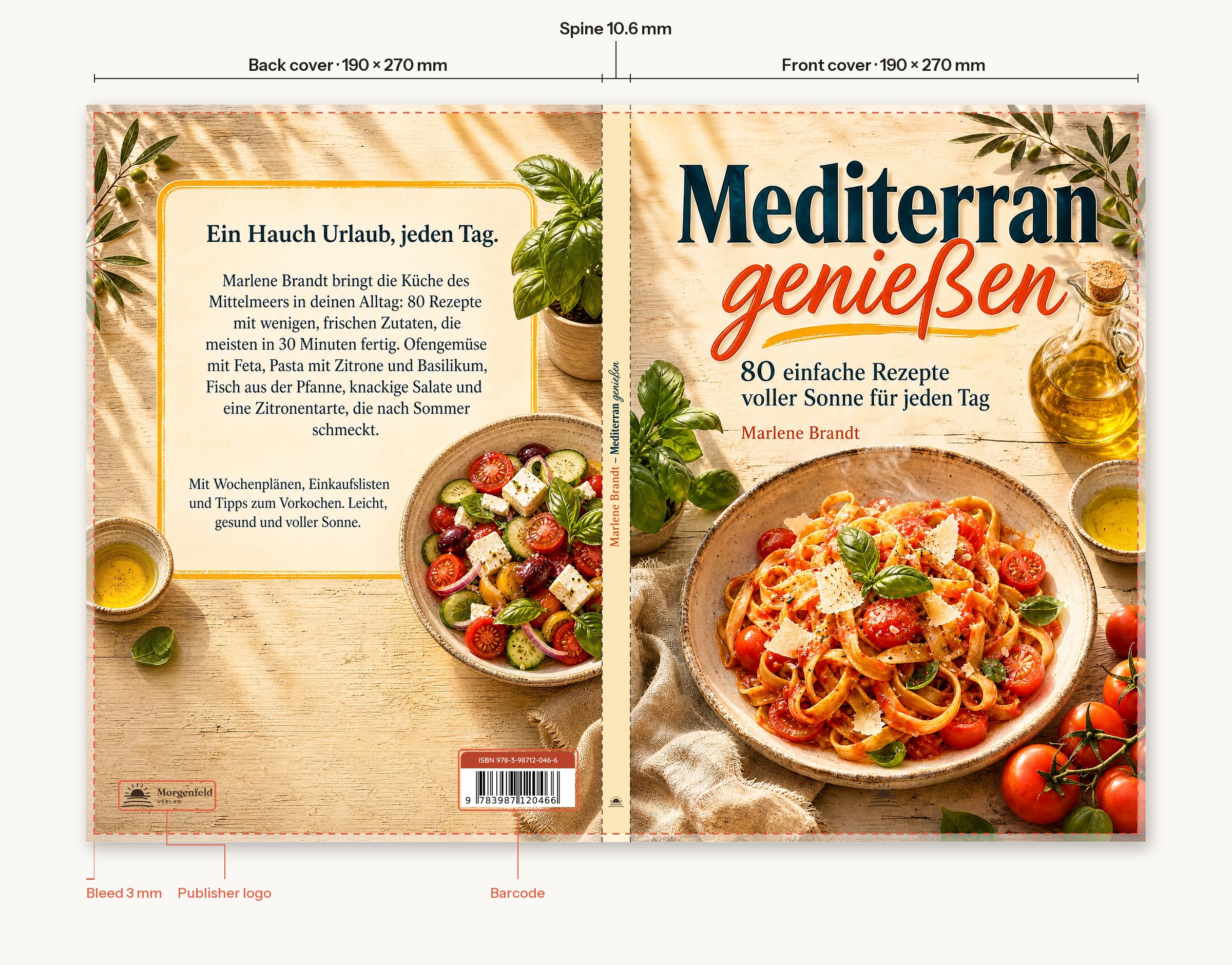
Image resolution. 300 dpi at the size the image is printed. A photo 1,200 pixels wide covers about 4 inches. Upscaling doesn't help; it makes the image bigger, not sharper.
Fonts. Every font must be fully embedded. If one is missing, the printer substitutes it and your line breaks change.
Transparency. Shadows, soft edges and semi-transparent areas are flattened before export, turned into solid pixels or shapes. Otherwise they can print differently from how they look on screen.
No printer's marks. Crop marks, registration marks, comments and bookmarks don't belong in the file. KDP and IngramSpark both reject them.
PDF/X-1a explained
PDF/X is a family of ISO standards for exchanging print files. They restrict what a PDF may contain so the printer has nothing to guess. PDF/X-1a is the strictest of the common versions:
- CMYK and spot colours only, no RGB. Anything bright on screen is converted to print colours first and can look a little duller, as it would in print anyway.
- All fonts embedded.
- No transparency; it has to be flattened.
- Output intent: the file states which print condition it was made for, for example a profile for coated paper.
- A PDF/X identifier inside the file, so preflight tools recognise it as PDF/X.
PDF/X-3 additionally allows colour-managed data such as RGB with a profile. PDF/X-4 also allows live transparency. IngramSpark's File Creation Guide lists only PDF/X-1a:2001 and PDF/X-3:2002. When in doubt, give them PDF/X-1a.
Ink coverage and black
Total ink coverage is the sum of cyan, magenta, yellow and black at any one spot. Too much ink dries badly and shows through. IngramSpark allows up to 240% and recommends 60% cyan, 40% magenta, 40% yellow and 100% black for rich black on large areas. Text at 24 pt or below should be pure black only, or the slightest misregistration makes it look blurry. Dark photos, and black converted from RGB, can exceed the limit.
Checklist before you upload
- Trim size and bleed are right (interior three edges, cover all round).
- Every image is at least 300 dpi at printed size.
- Every font is embedded.
- Transparency and layers are flattened.
- No crop marks, comments, form fields or bookmarks.
- For IngramSpark: PDF/X-1a:2001 or PDF/X-3:2002, CMYK images, ink coverage of 240% or less.
- Open the file in a second program and go through it page by page, especially images at the edge and the spine.
Turn your print PDF into PDF/X-1a
The Bookfairy PDF/X-1a converter checks your print PDF for colours, fonts, transparency and bleed, shows you the result before converting, and delivers a PDF/X-1a with CMYK colours, embedded fonts, flattened transparency and an output intent. One file costs $2.4020 tokens. If the book still needs typesetting, the typesetting tool delivers the print PDF for KDP and a second file for IngramSpark in one go.
Frequently asked
Does KDP require PDF/X?
It isn't mandatory. KDP's help names PDF/X-1a as the preferred format and also accepts other print PDFs. It wants embedded fonts, images of at least 300 dpi, 0.125 in (3.2 mm) bleed for full-bleed elements, flattened transparency and no crop marks, up to 650 MB.
What is PDF/X-1a?
PDF/X-1a is an ISO standard for exchanging print files. Only CMYK and spot colours are allowed, every font must be embedded, transparency isn't allowed, and the file carries an output intent, the colour profile of the print process.
Which PDF does IngramSpark want?
According to its File Creation Guide of 24 August 2026, PDF/X-1a:2001 or PDF/X-3:2002 for both interior and cover, CMYK images, 300 ppi recommended, and total ink coverage of no more than 240%.
How do I convert a PDF to CMYK?
Convert in the layout program or with a preflight tool, using the colour profile your printer specifies, then check the result: bright RGB colours often look duller in CMYK. IngramSpark converts RGB files itself before printing, but any colour shift is the publisher's responsibility.
What is total ink coverage?
The sum of cyan, magenta, yellow and black at any one spot. IngramSpark allows up to 240% and recommends 60/40/40/100 for rich black; text at 24 pt or below should be 100% black only.